

Key features · AI Assistant
Ask in plain language.
Get a table or a chart in seconds.
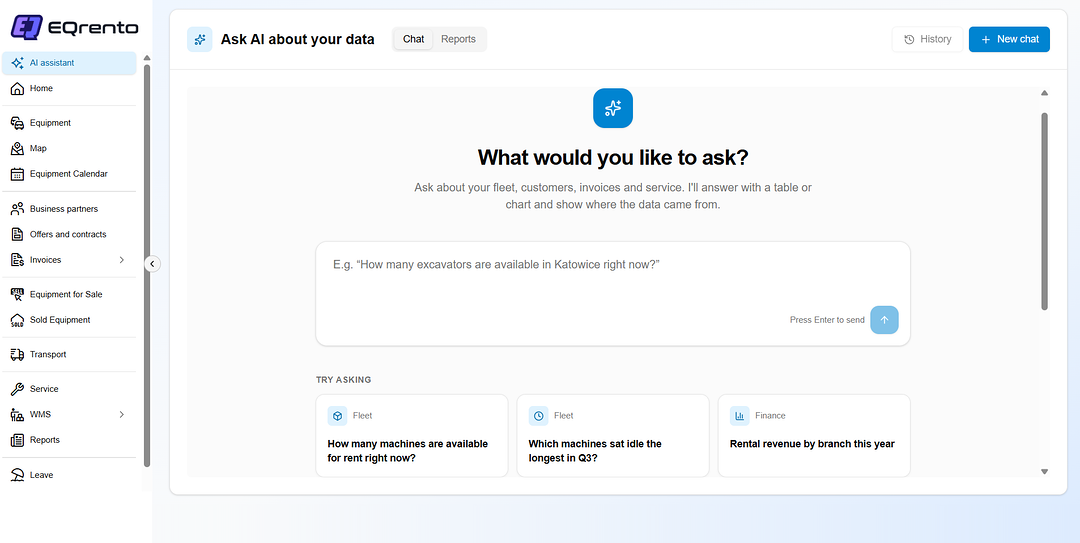
Which machines sat idle? Who owes you money? How much did each branch earn? The AI Assistant answers from your current EQrento data and shows where the numbers came from.
A paid add-on in every plan
What it does for you
-

Ask the way you talk
Type a question as you would ask a colleague – about your fleet, customers, contracts, invoices, service or sales. No reports to build or browse.
-

Answers as a table or a chart
You get a table or an area, bar, line or pie chart – in seconds, from the data your company has in EQrento right now.
-

Numbers you can check
Every answer describes the assumptions it made and the data it used, so you know exactly what you are looking at.
-

Keep it, print it, share it
Download any answer as CSV or PDF, print it, or save it as a report. The chat history stays, so you can pick up where you left off.
All features
Everything the AI Assistant does. It is a paid add-on, available in every plan.
Questions
- Questions in plain language about your fleet, customers, contracts, invoices, service and sales
- Ready-made question suggestions by area: fleet, finance, receivables, service and sales
- Answers based on your company’s current data in EQrento
Answers
- A table or a chart: area, bar, line or pie
- A description of the assumptions made and the source of the data
- CSV download, print and PDF for every answer
- Answers saved as reports (the Reports tab)
- Chat history
Questions you can ask
- “How much have we earned this month, including rentals not yet invoiced?”
- “Which machines sat idle the longest in Q3?”
- “Rental revenue by branch this year”
- “Which customers have invoices more than 30 days overdue?”
- “Which driver completed the most deliveries last month?”


Plans
A paid add-on in every plan
The AI Assistant can be added to Essential, Complete, Connected and Enterprise. Book a demo to see it answer questions about a fleet like yours and to get the price of the add-on.