

Key features · Invoicing
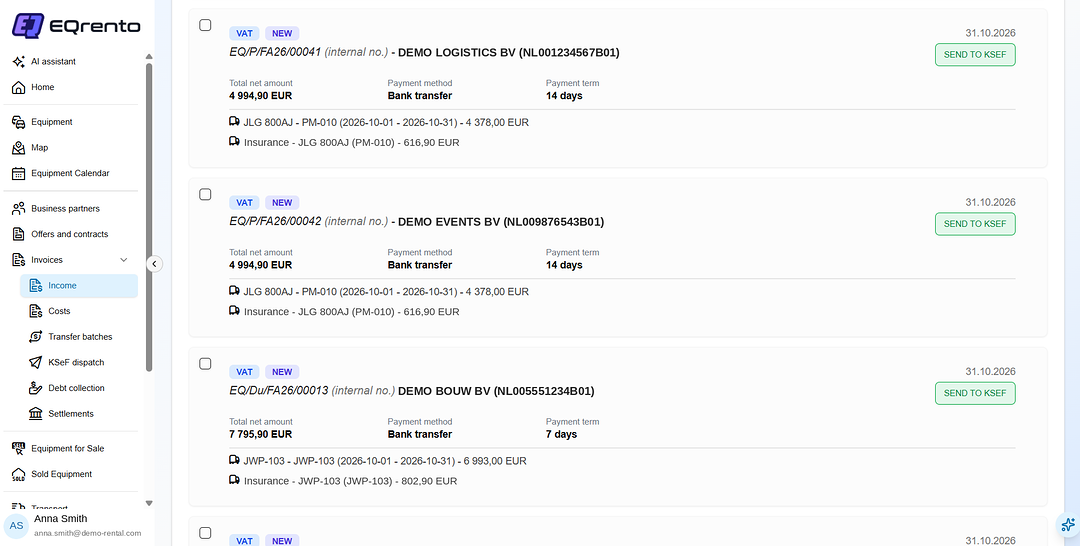
The invoice calculates itself.
You check it and send it.
When a rental ends, the invoice is ready – calculated from the contract and the data collected on the way, and still yours to adjust. Payments are matched, and unpaid invoices are chased for you.
Included in every plan
What it does for you
-

Calculated from what really happened
Rental time, the price list, downtime, transport and additional costs come from the contract. You can change anything before the invoice goes out.
-

Every document, numbered your way
Invoices, pro forma and advance invoices, corrections and notes – with your own prefixes and numbering for rental, sales and service.
-

Unpaid invoices chased for you
Payments are matched from imported bank statements, partial payments included. Unpaid invoices get automatic reminder emails with the PDF.
-

Straight to your accounting system
Invoices and customer data go to Exact, SnelStart, Comarch or Asseco Wapro, and to other systems through the open API.
All features
Everything in Invoicing. A tag marks the plan where a feature starts above Essential.
From contract to invoice
- Invoice calculated automatically from the contract: rental time, price list, downtime, transport and additional costs
- Every invoice can be edited before it is sent
- Rental time taken from the dates of the handover protocols Complete
- Fuel and cleaning from the protocols added automatically Connected
- Overtime from telematics added after your approval Connected
- Recurring invoicing, and invoicing on any day you choose
- Report of signed contracts that have no invoice yet
Documents and payments
- Document types: invoices, pro forma invoices, advance invoices, corrections and notes
- Your own prefixes and numbering (rental, sales, service, corrections, pro forma), with a bank account assigned to a prefix and a company
- Multiple VAT rates
- Multiple currencies Complete
- Invoices sent to the customer by email with the PDF
- Invoice list with filters, a counter, the net total of the filtered invoices by currency and CSV export
- Payment settlements, partial payments included
- Bank statements imported (MT940) to match payments
- Debt collection: automatic reminder emails with the PDF for unpaid invoices
Costs, accounting and e-invoicing
- Purchase invoices with statuses, cost types in a tree and a cost assigned to a machine
- Bank transfer batches ready to upload to your bank
- Accounting and ERP integrations: Exact, SnelStart, Comarch and Asseco Wapro
- Other systems connected through the open API
- KSeF: invoices sent by hand after a check or in batches, and an invoice can be rejected before sending Poland
- KSeF PDF preview and print Poland
- Purchase invoices fetched from KSeF Poland


Plans
Included in every plan
Invoicing, payments, reminders and the accounting integrations are part of Essential. Multiple currencies start with Complete; fuel, cleaning and approved overtime from telematics are added from Connected.