

Key features · Warehouse (WMS)
Parts and stock under control.
Tied to every service order.
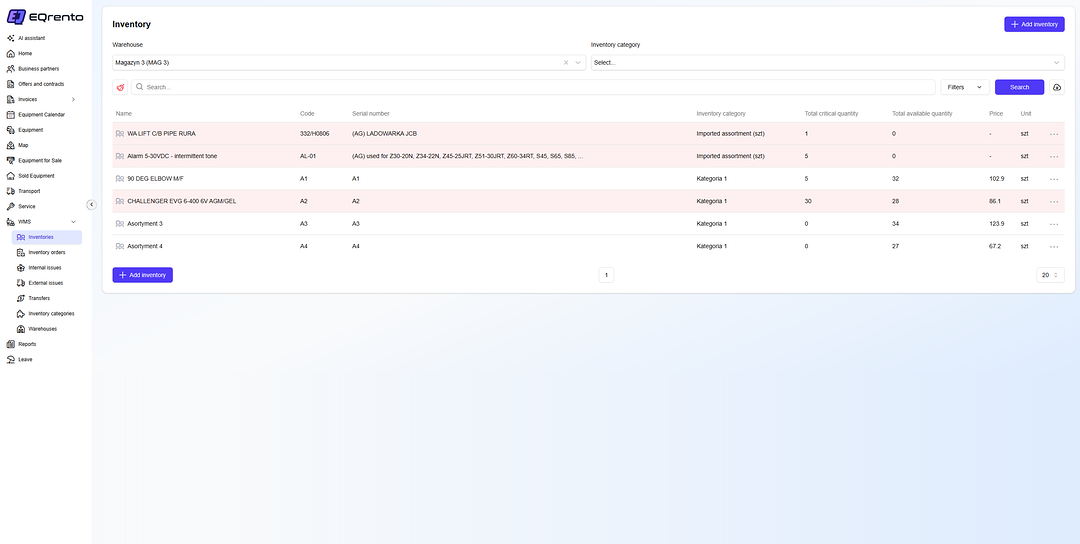
Stock levels and value across all your warehouses, always up to date. Parts taken for a repair are booked to that service order, and you’re alerted when an item runs low.
In the Enterprise plan
What it does for you
-

Every warehouse in one picture
Stock levels and their value for each warehouse, kept in order with inventory categories – and an alert when an item falls below its minimum level.
-

Parts follow the repair
Parts are reserved for a service order and issued to it, so the repair shows its real cost and the shelf shows the real stock.
-

Movements recorded as they happen
Receipts and issues get their documents automatically, and transfers move stock between warehouses without a spreadsheet.
-

Counts and balances for your books
Stocktaking comes with a search box and a draft that saves itself, plus opening and closing balances for your books.
All features
Everything in Warehouse (WMS), part of the Enterprise plan.
Stock
- Multiple warehouses, with stock levels and their value
- Inventory categories for parts and products
- Low-stock alerts when an item falls below its minimum level
Stock movements
- Movement documents created automatically for receipts and issues
- Transfers between warehouses
- Parts reserved for service orders and issued to them
- External issues and the sale of products with an invoice (the issue is created automatically)
Stocktaking and records
- Stocktaking with a search box and automatic saving of the draft
- Opening and closing balances
- Purchase history and purchase values of parts and products


Plans
Part of the Enterprise plan
Warehouse (WMS) comes with Enterprise, together with equipment and parts sales, custom integrations and a dedicated account manager. Enterprise is priced for your fleet.